If you have being using Calc Scripts in your Essbase database, I am sure you may have got confused when to use CALC DIM and when to use AGG for aggregation.
Here is the difference
CALC DIM (Product);
This line calculates the Product dimension doing both outline
aggregation (such as rolling all the Colas up into the parent
value) and member formulas, if they exist for members in that
dimension. If we want to calculate multiple dimensions using
this command (say, Market and Product), just separate them
with commas:
CALC DIM (Market, Product);
Remember how we said that “CALC DIM” not only does
aggregation but also member formulas? Well, how many member
formulas are there in the Market and Product dimensions?
That’s right: none, so “CALC DIM” is wasting time looking for
formulas that you know aren’t there. For sparse dimensions that
don’t have formulas, there’s a command that only does aggregation
and as such, is usually faster:
AGG (Market, Product);
Hope this would have made you some what comfortable about CALC DIM and AGG
So go on scripting
Wednesday, April 8, 2009

Sunday, March 29, 2009
Excel Add-in Reporting : Tip#1
You may have got requirements from you client that once they retrieve data at the Top level of different dimension, they just need to see the data at the Bottom Level for the same dimension at the same time. However, if you are using Hyperion Reports/Hyperion Financial Reporting for the reporting, you may need to do lots of customization to achieve the above requirement and at the same time, if your dimensions are too deep, there can be performance issues too.
So, you can suggest an Excel Addin report wherein you can set the Excel Addin "Options" to Zoom to Bottom Level.

This will very quick and your client would love to work on excel rather than on Hyperion Reports PDFs
So, you can suggest an Excel Addin report wherein you can set the Excel Addin "Options" to Zoom to Bottom Level.

This will very quick and your client would love to work on excel rather than on Hyperion Reports PDFs
Monday, January 12, 2009
Essbase Tricks & Tips - #1
As Essbase is so vast that we do forget some of the basics of Essbase. So I thought to start the "Tricks & Tips" series on my blog.
Disclaimer:
Please be informed that the information posted here is solely based on my knowledge and experience. Please check the content before using it - OraHyperion
Tip #1: Sometimes we face an error of Essbase server ( using command prompt or Windows Services) not getting startup.
The reason may be that the server could have got crashed while performing some calculation/restructure on the outline. Do not need to panic if this happens. Essbase engine always create a Security Backup file which contains the Users/Groups/Application/Filter information of the server in\bin folder of Essbase server. It regularly updated the .BAK file with the contents of .SEC file in the Essbase Server BIN folder.
Just delete the .SEC file and rename .BAK file to .SEC file and restart Essbase server. This re-establishes the Essbase server to the point when the Essbase server was working perfectly.
Disclaimer:
Please be informed that the information posted here is solely based on my knowledge and experience. Please check the content before using it - OraHyperion
Tip #1: Sometimes we face an error of Essbase server ( using command prompt or Windows Services) not getting startup.
The reason may be that the server could have got crashed while performing some calculation/restructure on the outline. Do not need to panic if this happens. Essbase engine always create a Security Backup file which contains the Users/Groups/Application/Filter information of the server in
Just delete the .SEC file and rename .BAK file to .SEC file and restart Essbase server. This re-establishes the Essbase server to the point when the Essbase server was working perfectly.
Tuesday, January 6, 2009
MS Excel Macro to Essbase's Rescue
I never knew that MS Excel's "Macros" can be so beneficial as far as Essbase is concerned. Macro is such a powerful scripting utility in Excel that it can be used in multiple facets.
As most of the Essbase design is done keeping the Finance in mind and all of us know that Finance guys are generally good in Excel.
MS Excel can be used to create files in different format which can be a source for multiple other systems.
Here is a sample Macro for generating a Text file which prompts for file name and stores the data from Excel in a text file.
Sub Macro1()
Dim sName As String, sString As String
Dim rng As Range, cell As Range
sSting = """" ' for inserting " in the output file
sName = ActiveSheet.Name
sName = Application.GetSaveAsFilename( _
InitialFileName:=sName & ".txt", _
FileFilter:="Text Files (*.txt),*.txt")
If sName = "" Then Exit Sub
Open sName For Output As #1
Set rng = Range(Range("A1"), _
Cells(Rows.Count, 1).End(xlUp))
For Each cell In rng
If cell.Text = "Yes" Then
Print #1, cell.Text , cell.Offset(0, 1).Text ' Output 1st column & 2nd column
Print #1, sSting & cell.Text & sSting ' Output 1st column under "
End if
Next
Close #1
End Sub
Things to note: Column Values (offset) starts from 0
As most of the Essbase design is done keeping the Finance in mind and all of us know that Finance guys are generally good in Excel.
MS Excel can be used to create files in different format which can be a source for multiple other systems.
Here is a sample Macro for generating a Text file which prompts for file name and stores the data from Excel in a text file.
Sub Macro1()
Dim sName As String, sString As String
Dim rng As Range, cell As Range
sSting = """" ' for inserting " in the output file
sName = ActiveSheet.Name
sName = Application.GetSaveAsFilename( _
InitialFileName:=sName & ".txt", _
FileFilter:="Text Files (*.txt),*.txt")
If sName = "" Then Exit Sub
Open sName For Output As #1
Set rng = Range(Range("A1"), _
Cells(Rows.Count, 1).End(xlUp))
For Each cell In rng
If cell.Text = "Yes" Then
Print #1, cell.Text , cell.Offset(0, 1).Text ' Output 1st column & 2nd column
Print #1, sSting & cell.Text & sSting ' Output 1st column under "
End if
Next
Close #1
End Sub
Things to note: Column Values (offset) starts from 0
Tuesday, December 30, 2008
Oracle Hyperion EPM System Version 11.1.1.1 Essbase Server Installation
Once Oracle Hyperion provided the link for their 11.1.1.1 suite...I could not find any valuable installation guide... so here its for u all
System Requirements
This documents the hardware and software requirement for the installation of Oracle Hyperion EPM System Essbase Version 11.1.1.1.
Hardware Requirements
Oracle Hyperion EPM System Release 11.1.1.1 Essbase product is available for the following environment
Operating System Processor
Oracle Enterprise Linux 4.0 – 5.x 32 – bit/ 64 - bit
Windows 2003 SP1 32 – bit / 64 - bit
Ret Hat Enterprise Linux 4.0.x – 5.0.x 32 – bit / 64 – bit
HP-UX 11.23-30.x 64 - bit
IBM AIX 5.2 ML7 – 6.1x 64 - bit
Solaris 9 – 10 64 - bit
Memory Minimum 1.5 GB is required (approx)
Hard Drive Minimum 2 GB is required (approx)
Note: These Operating system/ Processor combination supports all the products required for the installation of Oracle Hyperion EPM Essbase. For this documentation purpose, we would be using Windows 2003 SP1 – 32 bit Operating System
Software Requirements
Software Components
1. Hyperion Enterprise Performance Management System Foundation Services Release 11.1.1.1.0 Part 1 of 3, Part 2 of 3, Part 3 of 3
2. Oracle Hyperion Enterprise Performance Management System Installer, Fusion Edition Release 11.1.1.1.0
3. Oracle Hyperion Enterprise Performance Management Architect, Fusion Edition Release 11.1.1.1.0
4. Oracle Essbase Client Release 11.1.1.1.0
5. Oracle Essbase Server Release 11.1.1.1.0
Pre-requisites
Following are the pre-requisite for the successful installation of Oracle Hyperion EPM System Essbase Version 11.1.1.1
Web Application Server
Permanent Web Application server needs to be installed on the machine for Foundation Services and Essbase Administration Services. Following Web Application Servers are supported by above mentioned Oracle Hyperion EPM System products:
Oracle Application Server 10g
Oracle Web Logic Server 9.2
IBM WebSphere 6.1.0.17 – 6.1.x
Embedded Java Container
For this documentation purpose, we would be using the “default” Embedded Java Container which is Apache Tomcat 5.5.17
Repository/Database Requirement
Oracle Hyperion Shared Services and Essbase Administration Services require a repository database to store the repository information. Following Database are supported:
Oracle Database 9.2.0.5 – 11g
IBM DB2 8.2 FP4 – 9.1x
Microsoft SQL Server 2000 SP3a – 2005
For this documentation purpose, we would be using Oracle Database 10.2.0.1. Please note that Oracle Database client needs to be installed on the servers hosting Shared Services and EAS. Proper TNS Entry must be present to connect to the Relation database containing the Repository
For holding the Shared Services repository, a schema (HYPEPM_HSS) must be created and must be granted at least Connect, Resource and create privileges.
For EAS repository, a schema (HYPEPM_EAS) must be created and must be granted at least Connect, Resource and create privileges.
Installation Steps
Following steps needs to be performed for installation of Oracle Hyperion EPM System Essabase Version 11.1.1.1
Step 1
Copy the following files from the CD pack provided by the vendor or download it from the Oracle eDelivery (http://edelivery.oracle.com/) download site.
Oracle Hyperion EPM Installer 11.1.1.1 (V14818-01.zip)
Oracle Hyperion EPM Foundation Services 11.1.1.1 Part 1 (V14635-01.zip)
Oracle Hyperion EPM Foundation Services 11.1.1.1 Part 2 (V14819-01.zip)
Oracle Hyperion EPM Foundation Services 11.1.1.1 Part 3 (V14637-01.zip)
Oracle Hyperion EPM Essbase Server 11.1.1.1 (V14822-01.zip)
Oracle Hyperion EPM Essbase Client 11.1.1.1 (V14600-01.zip)
Oracle Hyperion EPM Architect 11.1.1.1 (V14633-01.zip)
Unzip all the file in a common directory (eg:\download_location). Assemblies of all the products will be copied into the directory “assemblies” (eg: \download_location\assemblies).
Step 2
If you want to run the installer from command prompt, Open Run->cmd and run the command InstallTool.cmd – console
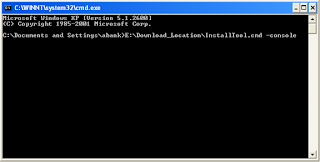
You can also run the installer in GUI mode by Double – Clicking the tool “InstallToll.cmd”.
Step 3
Choose the Hyperion Home directory.
Step 4
Select “New Installation and “Choose components by tier”
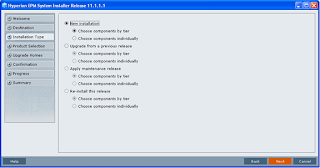
Step 5
This screen shows the product binaries available for installation. Select the components, that needs to be installed
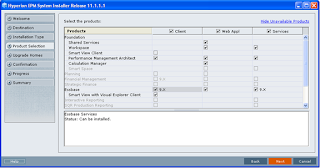
Next few screens shows the product's components selected for this installation.
Once the installation is over, we need to configure the products installed
Step 6
To configure the products installed, select “Configure” . Following screen will appear. Select Next to proceed.
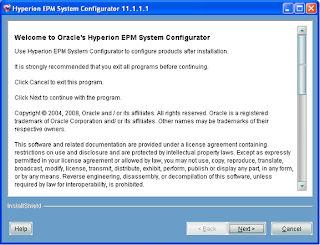
Step 7
Select the product that needs to be configured
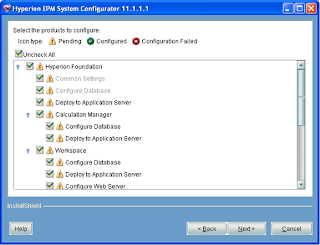
Step 8
Provide the Oracle DB Schema information for the Shared Services (HYPEPM_HSS). Note: The information provided in this screen is related to the repository of the Shared Services
Next few step lead to the configuration of the different products.
Please note the default ports of the different ports on which the respective products are installed
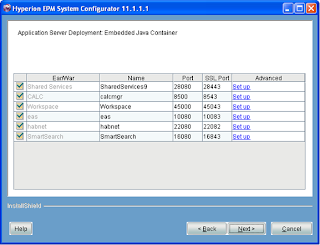
This completes the installation of the Oracle Hyperion EPM 11.1.1.1 Essbase server installation.
Important changes from the point of view of installation is that the default port of Shared Services has been changed from 58080 to 28080 (dont know why oracle did that)
So you are all set to install the new product suite...
Enjoy and do give the feedback
System Requirements
This documents the hardware and software requirement for the installation of Oracle Hyperion EPM System Essbase Version 11.1.1.1.
Hardware Requirements
Oracle Hyperion EPM System Release 11.1.1.1 Essbase product is available for the following environment
Operating System Processor
Oracle Enterprise Linux 4.0 – 5.x 32 – bit/ 64 - bit
Windows 2003 SP1 32 – bit / 64 - bit
Ret Hat Enterprise Linux 4.0.x – 5.0.x 32 – bit / 64 – bit
HP-UX 11.23-30.x 64 - bit
IBM AIX 5.2 ML7 – 6.1x 64 - bit
Solaris 9 – 10 64 - bit
Memory Minimum 1.5 GB is required (approx)
Hard Drive Minimum 2 GB is required (approx)
Note: These Operating system/ Processor combination supports all the products required for the installation of Oracle Hyperion EPM Essbase. For this documentation purpose, we would be using Windows 2003 SP1 – 32 bit Operating System
Software Requirements
Software Components
1. Hyperion Enterprise Performance Management System Foundation Services Release 11.1.1.1.0 Part 1 of 3, Part 2 of 3, Part 3 of 3
2. Oracle Hyperion Enterprise Performance Management System Installer, Fusion Edition Release 11.1.1.1.0
3. Oracle Hyperion Enterprise Performance Management Architect, Fusion Edition Release 11.1.1.1.0
4. Oracle Essbase Client Release 11.1.1.1.0
5. Oracle Essbase Server Release 11.1.1.1.0
Pre-requisites
Following are the pre-requisite for the successful installation of Oracle Hyperion EPM System Essbase Version 11.1.1.1
Web Application Server
Permanent Web Application server needs to be installed on the machine for Foundation Services and Essbase Administration Services. Following Web Application Servers are supported by above mentioned Oracle Hyperion EPM System products:
Oracle Application Server 10g
Oracle Web Logic Server 9.2
IBM WebSphere 6.1.0.17 – 6.1.x
Embedded Java Container
For this documentation purpose, we would be using the “default” Embedded Java Container which is Apache Tomcat 5.5.17
Repository/Database Requirement
Oracle Hyperion Shared Services and Essbase Administration Services require a repository database to store the repository information. Following Database are supported:
Oracle Database 9.2.0.5 – 11g
IBM DB2 8.2 FP4 – 9.1x
Microsoft SQL Server 2000 SP3a – 2005
For this documentation purpose, we would be using Oracle Database 10.2.0.1. Please note that Oracle Database client needs to be installed on the servers hosting Shared Services and EAS. Proper TNS Entry must be present to connect to the Relation database containing the Repository
For holding the Shared Services repository, a schema (HYPEPM_HSS) must be created and must be granted at least Connect, Resource and create privileges.
For EAS repository, a schema (HYPEPM_EAS) must be created and must be granted at least Connect, Resource and create privileges.
Installation Steps
Following steps needs to be performed for installation of Oracle Hyperion EPM System Essabase Version 11.1.1.1
Step 1
Copy the following files from the CD pack provided by the vendor or download it from the Oracle eDelivery (http://edelivery.oracle.com/) download site.
Oracle Hyperion EPM Installer 11.1.1.1 (V14818-01.zip)
Oracle Hyperion EPM Foundation Services 11.1.1.1 Part 1 (V14635-01.zip)
Oracle Hyperion EPM Foundation Services 11.1.1.1 Part 2 (V14819-01.zip)
Oracle Hyperion EPM Foundation Services 11.1.1.1 Part 3 (V14637-01.zip)
Oracle Hyperion EPM Essbase Server 11.1.1.1 (V14822-01.zip)
Oracle Hyperion EPM Essbase Client 11.1.1.1 (V14600-01.zip)
Oracle Hyperion EPM Architect 11.1.1.1 (V14633-01.zip)
Unzip all the file in a common directory (eg:
Step 2
If you want to run the installer from command prompt, Open Run->cmd and run the command InstallTool.cmd – console

You can also run the installer in GUI mode by Double – Clicking the tool “InstallToll.cmd”.
Step 3
Choose the Hyperion Home directory.
Step 4
Select “New Installation and “Choose components by tier”

Step 5
This screen shows the product binaries available for installation. Select the components, that needs to be installed

Next few screens shows the product's components selected for this installation.
Once the installation is over, we need to configure the products installed
Step 6
To configure the products installed, select “Configure” . Following screen will appear. Select Next to proceed.

Step 7
Select the product that needs to be configured

Step 8
Provide the Oracle DB Schema information for the Shared Services (HYPEPM_HSS). Note: The information provided in this screen is related to the repository of the Shared Services
Next few step lead to the configuration of the different products.
Please note the default ports of the different ports on which the respective products are installed

This completes the installation of the Oracle Hyperion EPM 11.1.1.1 Essbase server installation.
Important changes from the point of view of installation is that the default port of Shared Services has been changed from 58080 to 28080 (dont know why oracle did that)
So you are all set to install the new product suite...
Enjoy and do give the feedback
Subscribe to:
Posts (Atom)